
I got tired of checking ZTM schedules, so I put them on my wall
Living in the Gdańsk area means having a lot of public transit options. Trams, buses, and trains running from stops that are sometimes literally across the street. My problem? Never knowing when the next one actually leaves. I detest ZTM webpage, and I don’t want to install more apps on my devices. With number of lines and stops around it’s not feasible to check every single line. I also already have a some basics of smart home thorugh Home Assistant. So why not put departures there where every person in home will have easy access?
I looked around for existing integrations and found nothing that matched what I wanted. Some were abandoned, some only covered a single stop, one gave me the full picture of “what’s leaving from all the stops around my house in the next 15 minutes.” but was adding so many bloat to my ui, and external dependencies that I decided to do basic integration myself.
Let’s start with the beginning, source data? Gdańsk has an excellent dataset with clear usage rules available at https://ckan.multimediagdansk.pl/dataset/tristar, we even have GTFS-RT data if someone needs it.
The dataset is published under Creative Commons Attribution, so it’s free to use as long as I give credit to ZTM Gdańsk. No API keys, no registration, just hit the endpoints. The portal has a lot of data, from real-time GPS positions and estimated departure times to full GTFS schedules and traffic alerts. The departure endpoint at ckan2.multimediagdansk.pl takes a stopId parameter and returns JSON with estimated times. That’s the main one I care about.
Now, I also use SKM Trójmiasto (the commuter rail) regularly, and I’d love to include it. But from what I found, SKM only officially shares static GTFS data updated once a day. Their app clearly has real-time data, but there’s no public API for it. I’m not going to waste my time reverse-engineering how they did it in their application, so for now trains are out. If SKM ever opens up a real-time feed, I’ll happily add it.
As for how often to poll, the dataset description specifies that departure estimates and GPS positions are served from cache with a 20-second update delay from the TRISTAR system. Polling faster than that won’t give me fresher data. Static resources (stops, routes, trips) update once per day. I went with 30-second polling intervals in the integration, so I’m not asking for the same data twice.
Ok, so we have some data, what exactly do I want to achieve? I would need:
- Departure board sensors (real-time estimated departures per stop pole)
- Service alerts
- Config flow with nearby stop discovery and pole selection(as I want to publish it)
What stuff I don’t care about?
- Vehicle tracking on map - totally unnecessary for something that should provide quick glances.
- GTFS-RT direct consumption - it’s a standard I know, but I really don’t need it.
So what did I do?
Step 1: Talking to the API
First thing, get the data flowing. The API client ended up being pretty simple. The departure endpoint at ckan2.multimediagdansk.pl/departures takes a stopId and returns JSON with estimated times, line numbers, directions, delays, vehicle IDs. Stops and routes come from separate static endpoints on ckan.multimediagdansk.pl.
One quirk I had to deal with: ZTM wraps all their responses in date-keyed objects. Instead of just getting an array of stops, I get {"2026-05-11": {"stops": [...]}}. Not a big deal, just a small helper to unwrap it, but the kind of thing that trips me up if I don’t expect it.
I also filtered out virtual and non-passenger stops from the static data. ZTM has internal stops in their dataset that don’t make sense to show.
Step 2: The coordinator pattern
Home Assistant has this concept of a DataUpdateCoordinator that handles polling for me. I tell it how often to refresh and what to call, it handles scheduling, error states, and notifying all entities that depend on it.
I set up two coordinators. One for departures, polling every 30 seconds, one for alerts, polling every 5 minutes. The departure coordinator fetches all configured stops in parallel with asyncio.gather(), so adding more stops doesn’t multiply the wait time.
The alert coordinator needed more thought. I added a grace period: if the API fails but the last successful fetch was less than 15 minutes ago, it returns the cached data instead of marking the sensor as unavailable. The reasoning here isn’t about API reliability, it’s about safety. A stale alert is not a problem, it’s still valid information. But if the sensor goes unavailable because of a temporary API blip, I might miss an active disruption entirely. Better to show a potentially outdated alert than to show nothing.
Step 3: Sensors and events
Each stop pole becomes its own sensor with a DURATION device class, showing minutes until the next departure. The full departure list sits in the sensor’s extra attributes, so the Lovelace card can grab everything it needs.
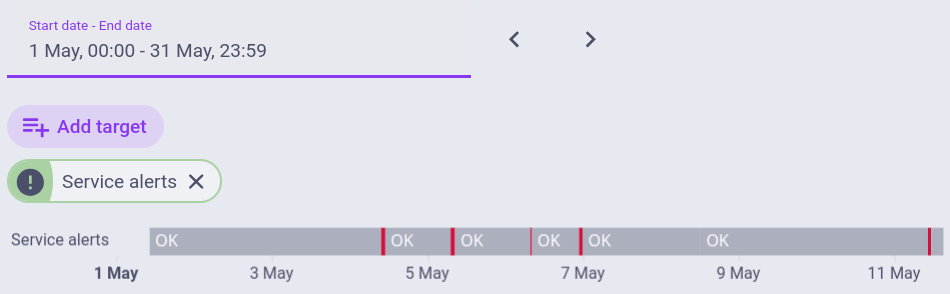
For alerts I went with two things. A binary sensor that flips on when ZTM publishes a disruption. I can scope it to just the lines I actually use (“my lines” mode pulls this dynamically from my departure data) or get everything. And a ztm_gdansk_alert event that fires only for new alerts. The coordinator tracks which alert titles it’s already seen, fires events for new ones, and prunes the set when alerts expire. I wired that to a push notification and now I know about disruptions before I leave the house.
One small detail: ZTM returns alert content with HTML tags. I strip those for data sanitization, so my UI won’t break on unexpected markup.
Step 4: Making it usable for others
If this was just for me, I’d hardcode my stop IDs and call it a day. But I wanted to publish it, so the config flow needed to be actually pleasant to use.
The setup is a three-step wizard. First, it fetches all 500+ stops from the API, groups them by location name, then sorts them by haversine distance from the Home Assistant’s home coordinates. Nearest stops show up first in the dropdown, no scrolling through an alphabetical list of every stop in the Tricity.
Second step, pick specific poles within the chosen stop group. Same physical location can have multiple poles for different directions, so I only subscribe to the ones I care about.
Third step, alert preferences. Enable or disable, choose scope, done.
Step 5: The departure board card
Sensor values on a dashboard are fine for one stop, but I wanted a proper departure board showing everything at a glance.
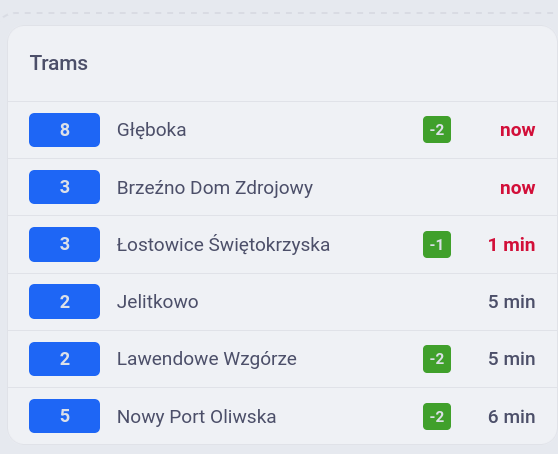
The card is a custom Lovelace element built with plain Web Components, no framework. I point it at my departure sensor entities and it merges all their departure lists into one sorted view. Lines get color-coded badges (blue for trams, green for buses), delays show as +X min indicators, and anything under a minute gets a red “now” tag. It picks up my Home Assistant theme colors, so it fits in with whatever theme I’m running.
The card also auto-registers itself when the integration loads, so I don’t need to manually add JS resources to my Lovelace config.
The result
I have a tablet running a Home Assistant dashboard. Weather, calendar, and now a departure board. I can check transit timing while in a hallway preparing for exit. That’s all I wanted and that’s what I got.
That last alert automation alone has already saved me a few frustrated waits at a stop wondering why nothing is coming.
Available via HACS as a custom repository, requires Home Assistant 2024.1 or newer.
Repository: github.com/piotron/hass-ztm-gdansk License: MIT